
1. What makes checkout counter lighting different from normal shelf lighting?
Checkout counters are high-contact commercial zones. UL Solutions’ retail fixtures and merchandise displays reference guide provides useful safety guidance for commercial displays, showcases, temporary retail fixtures, and other electrically equipped customer-facing installations. Customers stand close, staff work for hours, and payment equipment creates glare risks. LED strip lights for checkout counter projects must support visibility without turning the counter into a harsh light box.
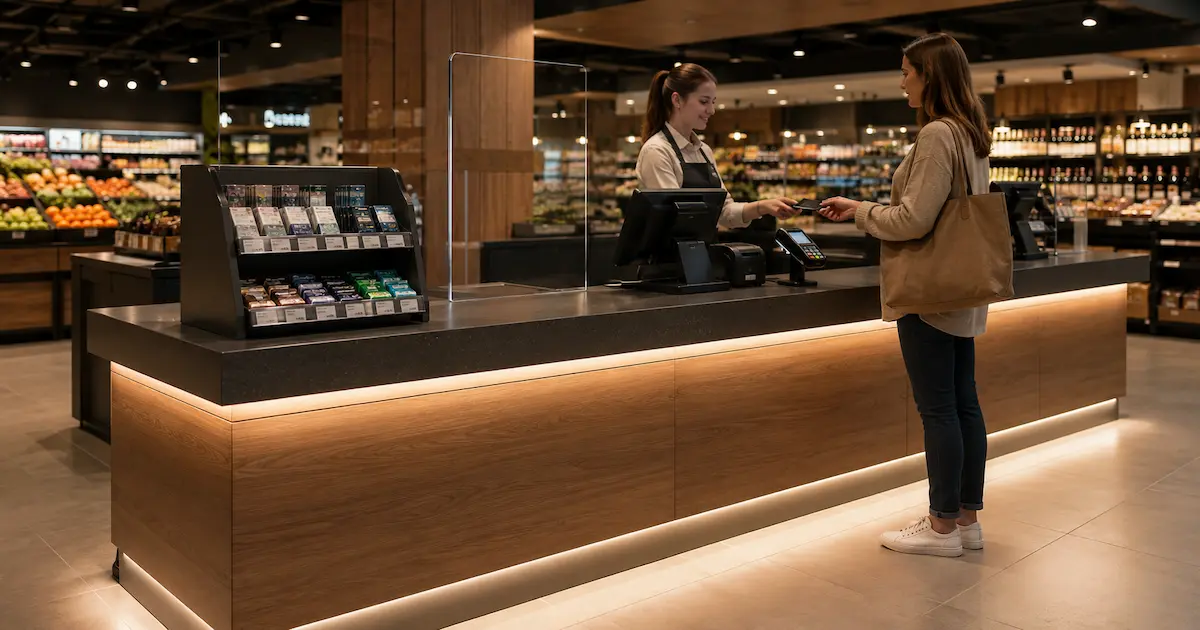
Unlike LED strip lights for supermarket shelving, which usually highlight products from a greater viewing distance, checkout-counter lighting operates within arm’s reach of customers, staff, and POS equipment. That means dot-free output, low heat, and safe cable routing matter more than raw brightness. In a supermarket counter, the strip may run under a front lip to guide customer flow. In a pharmacy, it may light a glass service edge without changing the true color of medicine packaging. In a boutique, it may create a premium glow on wood or stone.
We often see installers struggle with counters that were designed before the lighting plan was approved. No cable groove. No service access. No space for drivers. That creates field improvisation, and field improvisation eats profit.
| Checkout Counter Lighting Factor | Why It Matters | Practical Target |
|---|---|---|
| Glare control | Protects staff eyes and POS screen readability | Frosted diffuser or indirect mounting |
| Heat control | Reduces early lumen loss and adhesive failure | Aluminium profile, suitable wattage |
| Color accuracy | Keeps goods, cash, and receipts looking natural | CRI 90+ for premium retail |
| Serviceability | Cuts future labor cost | Accessible driver and connectors |
| Safety compliance | Reduces liability | CE, RoHS, UL, or local required marks |
2. Which LED strip type is best for checkout counter applications?
The best strip type depends on visibility distance, surface finish, and project budget. For most checkout counters, COB LED strips or high-density SMD strips give the cleanest result because they reduce visible dots under diffusers.
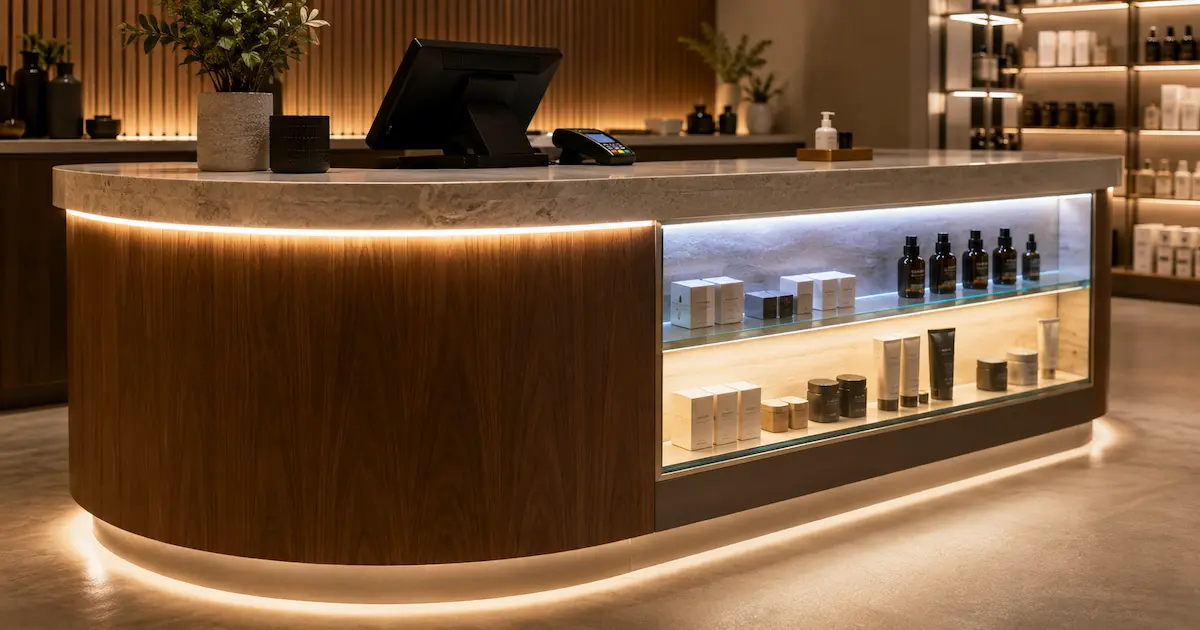
A standard low-density SMD strip can work in a hidden indirect slot. However, if the strip is visible through acrylic, glass, or a shallow aluminium channel, dotting becomes a complaint. We once saw a cosmetics counter rejected because the client could see light points reflected on a glossy black cash desk. The strip was bright enough, but it looked cheap.
Understanding what a COB LED strip is helps explain why COB technology creates a continuous, dot-free light line suited to curved counters, reception desks, and luxury retail cash wraps. SMD2835 or SMD2216 high-density strips are also reliable options when paired with a deep enough profile. For budget convenience stores, a mid-power 24V SMD2835 strip can give a good balance between cost and performance.
| LED Strip Type | Best Use at Checkout Counter | Main Benefit | Watch Point |
|---|---|---|---|
| COB LED strip | Premium counters, visible line lighting | Dot-free appearance | Needs good thermal path |
| SMD2835 high density | General retail counters | Strong lumen output | Check LED spacing |
| SMD2216 | Slim details and narrow profiles | Smooth output in small channels | Lower max power |
| RGB/RGBW strip | Brand accents and promo zones | Color scenes | Needs controller planning |
| Tunable white strip | Mixed day/night retail use | Adjustable CCT | Requires compatible driver |
The following educational video provides a practical overview of the main factors to consider when selecting LED strip lighting for professional applications such as retail checkout counters.
3. Should you choose 12V or 24V LED strip lights for checkout counter runs?
For most commercial checkout counters, 24V is the safer specification because it reduces current, limits voltage drop, and supports longer runs with more stable brightness. A 12V strip can still suit short counters under two meters, but longer runs need additional feed points and a professional LED strip light wiring plan to control voltage drop and cable loading.
When we tested this against a standard 12V strip, a 5-meter run showed visible dimming near the far end under a single-end feed. The 24V version held brightness more evenly under the same power level. That matters at checkout because uneven light across the front panel can make the counter look poorly built.
| Feature | 12V LED Strip | 24V LED Strip |
|---|---|---|
| Best counter length | Short runs, small kiosks | Medium to longer commercial runs |
| Current load | Higher at same wattage | Lower at same wattage |
| Voltage drop risk | Higher | Lower |
| Cut length | Often shorter | Often longer |
| Driver availability | Very common | Very common in commercial projects |
| Recommended use | Under 2–3 m sections | Most checkout counter systems |
4. What color temperature and CRI should retail counters use?
The U.S. Department of Energy’s guide to lighting principles and terms explains how color temperature shapes the appearance of light while CRI indicates how accurately illuminated objects and surfaces reproduce their natural colors. For checkout counters, 3000K to 4000K is the usual range. Warm 3000K suits fashion, hospitality, and wood finishes. Neutral 4000K suits grocery, pharmacy, electronics, and service counters.
CRI matters because the checkout area is where customers inspect receipts, packaging, loyalty cards, and payment details. Low CRI strips can make skin tones look dull and product colors inaccurate. For general retail, CRI 80 may pass. For cosmetics, jewelry, eyewear, or boutique counters, CRI 90+ is the better choice.
In our lab tests using integrating spheres, we check lumen output, CCT tolerance, CRI, and color consistency before advising a strip for retail fixture use. We also review MacAdam steps. For chain stores, 3-step or 5-step binning helps keep counter lighting consistent across branches.
| Retail Counter Type | Suggested CCT | Suggested CRI | Reason |
|---|---|---|---|
| Fashion boutique | 2700K–3000K | 90+ | Warm, premium feeling |
| Supermarket checkout | 3500K–4000K | 80–90 | Clean task visibility |
| Pharmacy counter | 4000K | 90+ | Accurate label reading |
| Electronics store | 4000K–5000K | 80+ | Crisp modern look |
| Hotel reception cashier | 3000K | 90+ | Comfort and luxury tone |
5. How bright should LED strip lights be under or around the checkout counter?
Brightness should support visibility without causing glare. A practical range for led strip lights for checkout counter designs is often 600 to 1200 lumens per meter before diffuser loss, depending on mounting position and counter surface.
If the strip lights the customer-facing toe kick, lower output may be enough. If it illuminates a work surface, you need stronger output and better shielding. Glossy stone, stainless steel, and glass reflect sharply, so brightness must be tested on real material. Matte wood absorbs more light, so it may need higher lumen output.
In LED strip lights for bakery display and checkout-counter projects, excessive output can create glare on glass and polished surfaces, so reducing power and using a deeper profile often produces a cleaner result.
| Mounting Position | Typical Power Range | Brightness Aim | Notes |
|---|---|---|---|
| Under front lip | 4.8–9.6 W/m | Accent and guidance | Avoid direct eye line |
| Inside acrylic panel | 9.6–14.4 W/m | Even glow | Use high density or COB |
| Under countertop task zone | 10–15 W/m | Functional light | Shield from POS screens |
| Toe kick lighting | 4.8–7.2 W/m | Low-level guidance | Use dimming if possible |
| Brand color strip | 7.2–14.4 W/m | Visual accent | Plan controller access |
6. What aluminium profiles and diffusers work best at checkout counters?
Aluminium profiles are not just neat trim. They manage heat, protect the strip, hide wiring, and shape the beam. For checkout counters, recessed and surface-mounted profiles are the most common choices.
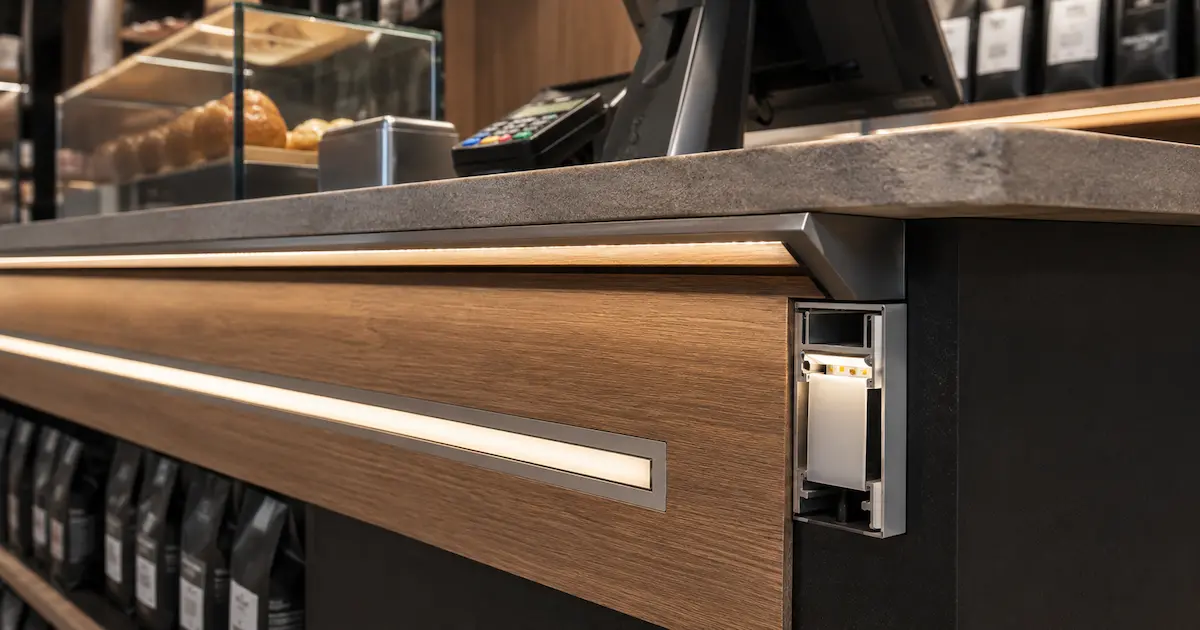
A recessed profile works well when the counter fabricator can cut a clean groove. It gives a flush finish and reduces accidental impact. Surface-mounted profiles are easier for retrofit projects, though they need careful placement so they do not catch hands, bags, or cleaning cloths. Corner profiles are useful under overhanging counter lips because they aim light at 45 degrees.
Diffuser choice changes the result. Opal diffusers hide dots better but reduce output. Clear covers retain brightness but can show LED points. Black diffusers can look premium when off, though they cut more light.
Ensure thermal contact between the strip PCB and aluminium base; poor contact traps heat and shortens life.
| Profile Type | Best Application | Benefit | Limitation |
|---|---|---|---|
| Recessed profile | New counter fabrication | Flush, clean appearance | Needs accurate groove |
| Surface profile | Retrofit counters | Fast installation | More visible hardware |
| Corner profile | Under lip lighting | Angled beam control | Space must be checked |
| Deep profile | Dot-free line lighting | Better diffusion | Larger cutout |
| Bendable profile | Curved checkout desk | Fits radius designs | Lower mechanical strength |
7. How should power supplies, dimming, and controls be specified?
A checkout counter lighting system is only as stable as its driver and control layout. A proper LED profile driver calculation should consider total strip wattage, cable length, dimming requirements, operating hours, and the necessary power reserve. A good rule is to load the driver at about 80% of its rated capacity, not at the full limit.
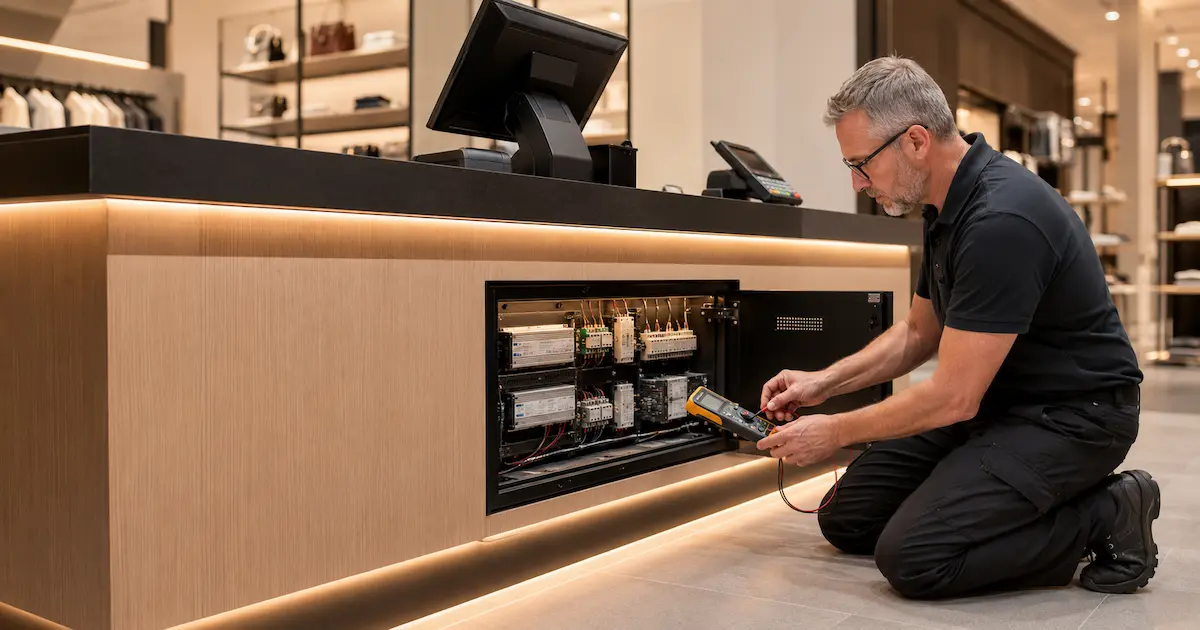
For example, if a counter uses 6 meters of 10W/m LED strip, the connected load is 60W. A 75W or 100W driver gives headroom. If dimming is needed, match the driver to the control method: 0–10V, TRIAC, DALI, PWM, RF, or smart controller. The DALI Alliance’s overview of DALI protocol key features explains how standardized digital control supports accurate, repeatable dimming and consistent light-level adjustment in commercial lighting systems.
Avoid placing drivers inside sealed wooden counters with no airflow. Put drivers in ventilated, serviceable positions and label each driver and output channel.
| Control Need | Recommended Option | Good For | Watch Point |
|---|---|---|---|
| Simple on/off | Non-dimmable driver + switch | Budget counters | No scene control |
| Smooth dimming | PWM dimmer | LED strip stability | Match voltage and current |
| Building control | DALI or 0–10V driver | Larger stores | Needs control wiring |
| Brand color scenes | RGBW controller | Promotional counters | Check controller load |
| Remote adjustment | RF controller | Retrofit projects | Signal range may vary |
8. What IP rating and safety compliance do checkout counter strips need?
Specifications for LED strip lights for shopping mall checkout areas must account for cleaning sprays, drink spills, dust, frequent customer contact, and long daily operating hours. For dry retail stores, IP20 inside a protected profile may be acceptable. For grocery, pharmacy, cafe, or food service counters, IP65 or higher is often safer.
The International Electrotechnical Commission’s guide to IP ratings explains how enclosure protection is classified against the intrusion of dust, solid objects, and liquids. IP67 sleeves add moisture resistance, though they may be bulky for slim profiles. For indoor counters with heavy cleaning, IP65 paired with an aluminium profile is a pragmatic balance.
Safety marks matter because checkout counters sit close to customers and staff. CE and RoHS are common for Europe. UL or ETL may be requested for the United States and Canada. Match the actual product model, driver, and installation method to the needed standard.
| IP Rating | Protection Level | Suitable Counter Use | Trade-Off |
|---|---|---|---|
| IP20 | Dry indoor protection | Protected channels in dry retail | No moisture defense |
| IP54 | Light dust and splash resistance | Low-risk service counters | Limited wash resistance |
| IP65 | Dust-tight, water jet resistance | Grocery, cafe, pharmacy | More heat retention |
| IP67 | Temporary immersion resistance | Wet-prone custom counters | Larger size, harder bending |
| IP68 | Continuous water exposure | Rare for checkout counters | Higher cost |
9. How can installers prevent failures, flicker, and uneven light?
Most checkout-counter failures come from weak solder joints, incorrect driver sizing, poor heat dissipation, long single-end runs, and low-grade adhesive, while knowing how to fix LED strip lights flickering helps technicians identify dimmer and driver compatibility problems. The good news? A simple checklist prevents many callbacks.
Use dual-end feeding or mid-point feeding for longer runs. Keep polarity clear. Test every section before closing the counter. Clean the mounting surface with alcohol before applying tape, and use mechanical clips where heat or cleaning chemicals may weaken adhesive. Avoid placing connectors where staff can kick or pull them.
| Problem | Likely Cause | Field Fix | Prevention |
|---|---|---|---|
| Far end looks dim | Voltage drop | Add feed point | Use 24V and correct cable gauge |
| Flicker during dimming | Driver/dimmer mismatch | Replace dimmer or driver | Test control set before bulk order |
| Strip falls down | Poor adhesion or heat | Add clips, clean surface | Use aluminum profile |
| Color mismatch | Mixed LED bins | Replace affected batch | Specify binning tolerance |
| Early failure | Excess heat | Lower wattage, add profile | Keep driver and strip ventilated |
| Dead section | Bad cut or solder joint | Re-solder or replace segment | Factory pre-soldered leads |
10. What should buyers specify before ordering checkout counter LED strips?
Clear specifications protect your margin. Before ordering led strip lights for checkout counter projects, define electrical, optical, mechanical, safety, and packing requirements. Do this before price negotiation, not after.
Your RFQ should include voltage, wattage per meter, CCT, CRI, LED type, PCB width, cut length, IP rating, profile type, diffuser type, driver model, dimming protocol, cable length, connector type, labeling, and certification needs. If you order for a fixture factory, send counter drawings. If you order for installation, send photos of the site and power location.
Custom pre-soldered leads can save real labor. For example, a 500 mm lead on each module may prevent installers from soldering inside a cramped cash desk. Pre-cut strip kits also reduce site waste and speed up repeat chain-store work.
| RFQ Item | What to Specify | Why It Matters |
|---|---|---|
| Electrical | 24V, W/m, driver load | Controls voltage drop and safety |
| Optical | CCT, CRI, lumen/m, binning | Keeps appearance consistent |
| Mechanical | Width, cut length, profile | Fits the counter design |
| Protection | IP rating, coating type | Matches cleaning conditions |
| Control | Dimming method, controller | Avoids flicker and incompatibility |
| Custom work | Leads, connectors, labels | Reduces installation labor |
| Compliance | CE, RoHS, UL, CB | Supports local approval |
Conclusion
Good checkout counter lighting is a technical decision, not a decorative afterthought. The right strip type, 24V layout, CCT, CRI, profile, driver, IP rating, and installation checklist can reduce callbacks and protect project profit. LED strip lights for checkout counter use should be tested as a full system, not judged by the strip alone. If you are unsure about voltage drop, driver load, or profile depth, send our engineering team your counter drawing and we’ll review the details.
FAQ
Q1: What are led strip lights for checkout counter applications?
They are linear LED systems installed under, inside, or around checkout counters to provide task light, accent light, customer guidance, or brand effects. A complete setup usually includes LED strip, aluminium profile, diffuser, driver, cable, and control parts.
Q2: Are 12V or 24V LED strips better for checkout counters?
24V is usually better for commercial checkout counters because it reduces current and voltage drop on longer runs. 12V can work for short counters, kiosks, and small retrofit jobs where the driver is close to the strip.
Q3: What color temperature should I use for a retail checkout counter?
Use 3000K for warm boutique or hotel-style counters, 3500K to 4000K for supermarkets and pharmacies, and 4000K to 5000K for electronics or modern service counters. Test the sample with the actual counter finish.
Q4: Do checkout counter LED strips need waterproof protection?
Dry retail counters may use IP20 inside a protected profile. Counters near drinks, food, cleaning sprays, or pharmacy service areas should consider IP65 or higher. Balance moisture protection with heat dissipation.
Q5: How can I reduce installation time on repeat counter projects?
Use pre-cut LED strips, pre-soldered leads, labeled cables, matched drivers, and consistent profiles. Ask for samples built to the same drawing used in production, then approve the whole kit before bulk ordering.
